
Translator pen meaning and basic working logic
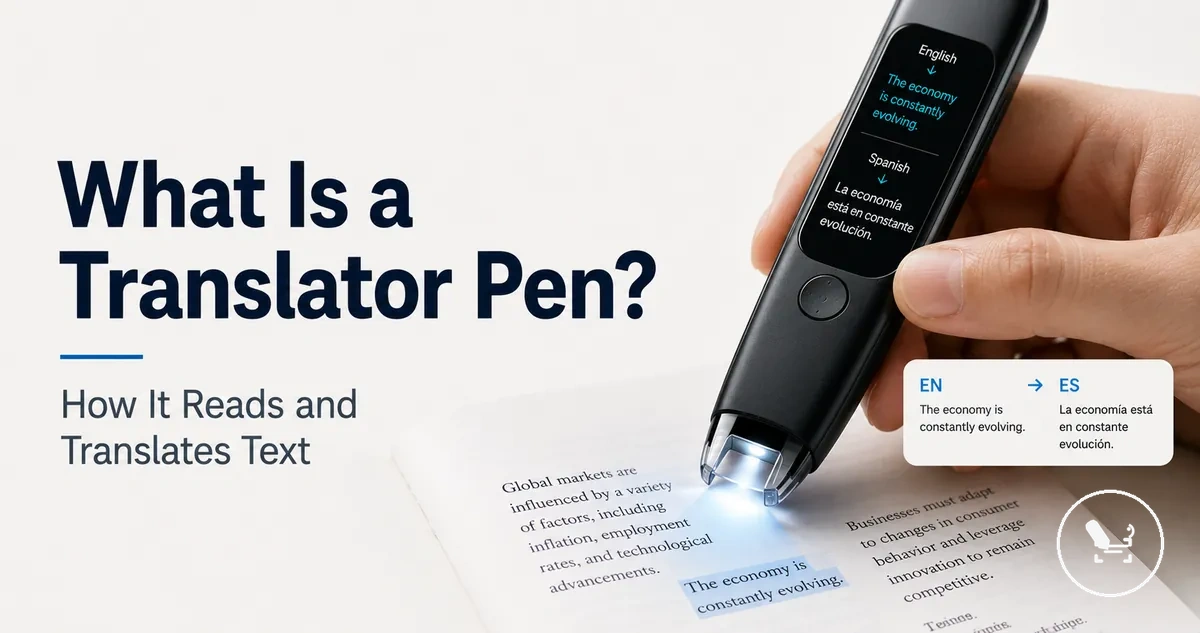
A translator pen is a handheld device designed to scan printed text and convert it into translation output using OCR-based processing. It works as a compact reading tool that captures physical text through a scanning tip and presents results on a screen or through audio. A translator pen differs from translation apps and dictionary pens because it focuses on direct text scanning instead of manual input or word-by-word lookup.
The working process starts when the translator pen scans printed text using its scanning tip, where OCR identifies and captures characters from the surface. This captured content is converted into digital form and processed to generate translation output based on a selected language pair. The result is then displayed on the screen or delivered as audio, and its performance can vary depending on connectivity, text clarity, and device configuration.
Translator pens sit in a different category from nearby tools like translation apps and dictionary pens, which rely on different input methods and output structures. While apps often depend on typed or camera-based input, and dictionary tools focus on individual word meanings, the translator pen is centered on scanning printed material. Its behavior also depends on OCR accuracy, language support, and processing conditions rather than a single fixed output model.
In practice, a translator pen helps bridge printed content and readable or audible translation output in a compact form. Its usefulness comes from combining scanning, recognition, and translation output into one workflow, while still depending on text quality, language coverage, and system capability.
What a translator pen is
A translator pen is a handheld scanning device used to read printed text and provide translation or reading output. It functions as a compact OCR reading pen that captures physical text through a scanning tip and converts it into digital translation output. The core purpose of a translator pen is to support quick understanding of printed material across different language pairs.
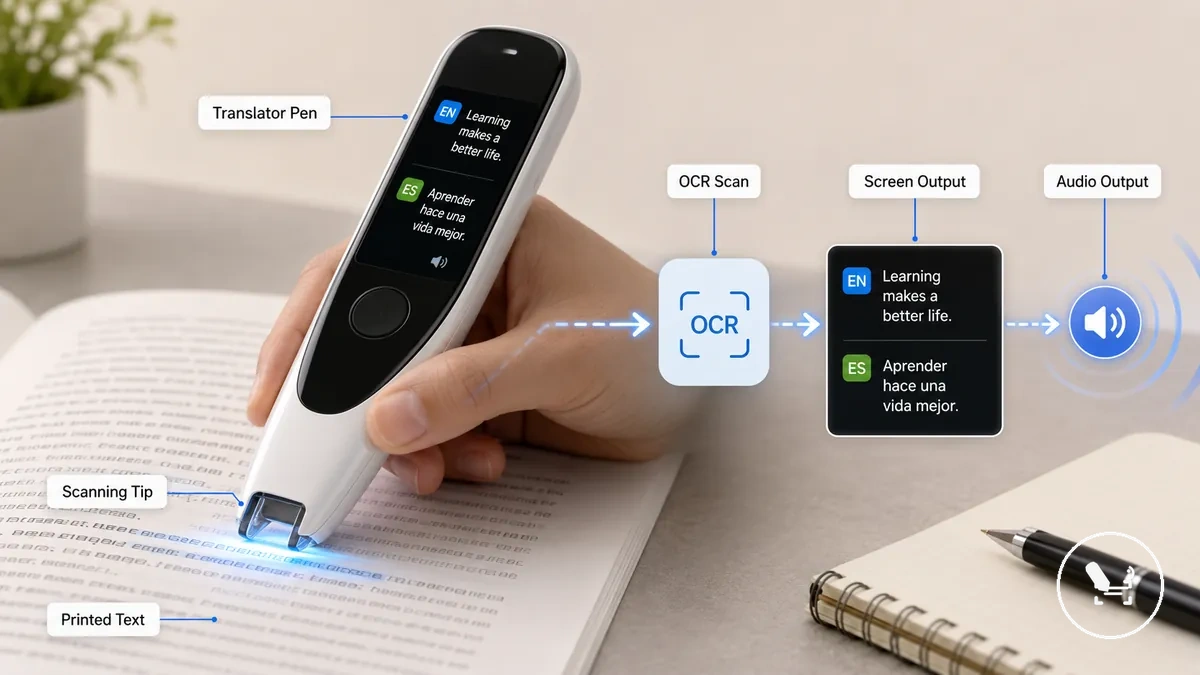
The translator pen works by scanning printed text through its scanning tip, where OCR identifies and captures characters from the surface. This captured data is processed into translation output and displayed on a screen or delivered as audio depending on the device setup. Performance and reading output can vary based on text clarity, language pair support, and connectivity conditions, since different models handle recognition and processing differently.
To understand its position in the broader system of reading tools, the translator pen guide helps distinguish how this handheld scanning device relates to nearby tools like dictionary pens or app-based translation systems. A simple example is scanning printed text on a sign or menu during travel, where the device converts OCR input into readable translation output for immediate comprehension.
:contentReference[oaicite:0]{index=0}
What a translator pen is not meant to replace
A translator pen is not meant to replace other language tools and instead focuses on supporting printed text reading and translation tasks. It works as a handheld scanning device for OCR-based translation output, but its role is limited to specific printed-text use cases rather than covering every language need.
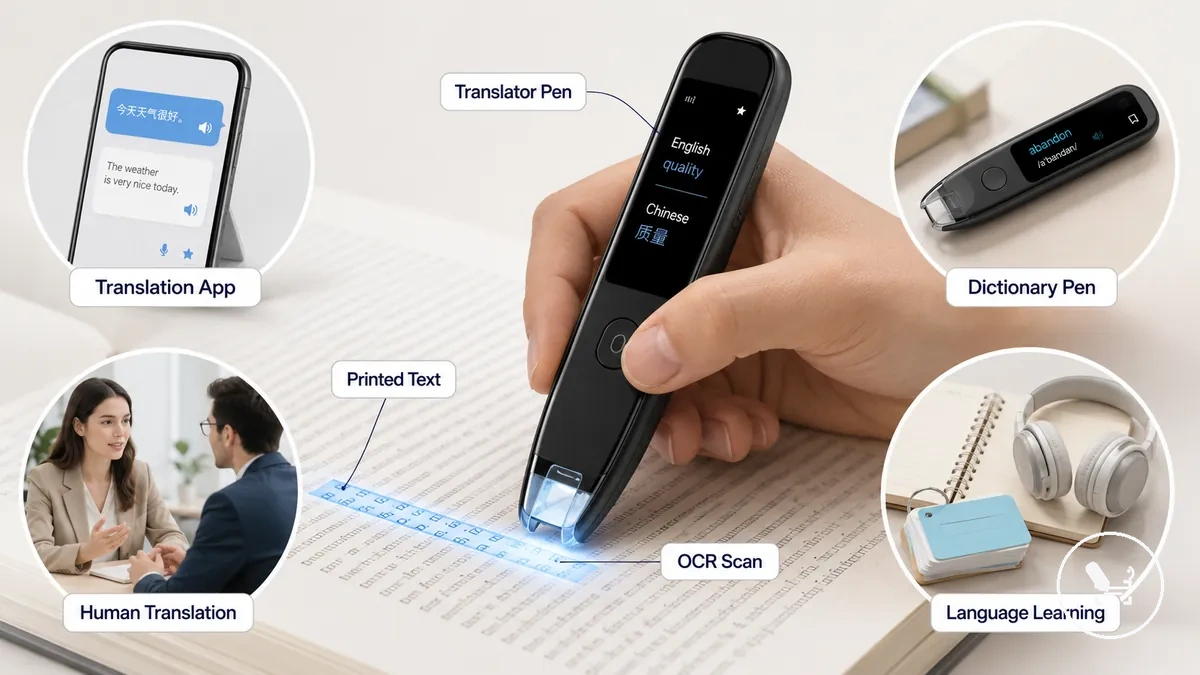
Translator pens are often used alongside adjacent tools such as translation apps, dictionary pen devices, human translation, and language learning resources. A translation app may rely on mobile input like camera or voice rather than direct scanning of printed text. A dictionary pen typically focuses on word-level meanings instead of full sentence translation output. Human translation provides deeper contextual understanding that OCR-based reading tools cannot fully capture. Language learning tools focus on long-term skill building rather than immediate translation output. These differences depend on the task, language pair, printed text quality, and user expectations.
| Translator pen supports | Not meant to replace |
|---|---|
| Printed text scanning for quick reading support | Full translation apps with camera or voice input workflows |
| Basic OCR-based translation output on a screen or audio | Dictionary pen tools focused only on vocabulary definitions |
| On-the-spot reading support in real-world contexts | Human translation with deep contextual and cultural nuance |
| Short-term comprehension aid for printed material | Structured language learning systems for long-term mastery |
A translator pen is still useful when the goal is quick understanding of printed text in practical situations such as travel or study. Its role remains focused on supporting reading output from OCR scanning rather than replacing broader language systems, which serve different learning and communication purposes.
Main parts of a translator pen scanner
A translator pen scanner is a handheld device that uses a scanning tip and OCR sensor to capture printed text and convert it into readable translation output. It brings together physical input, text recognition, and digital processing in one compact structure, grouping its function into capture, processing, and output stages.
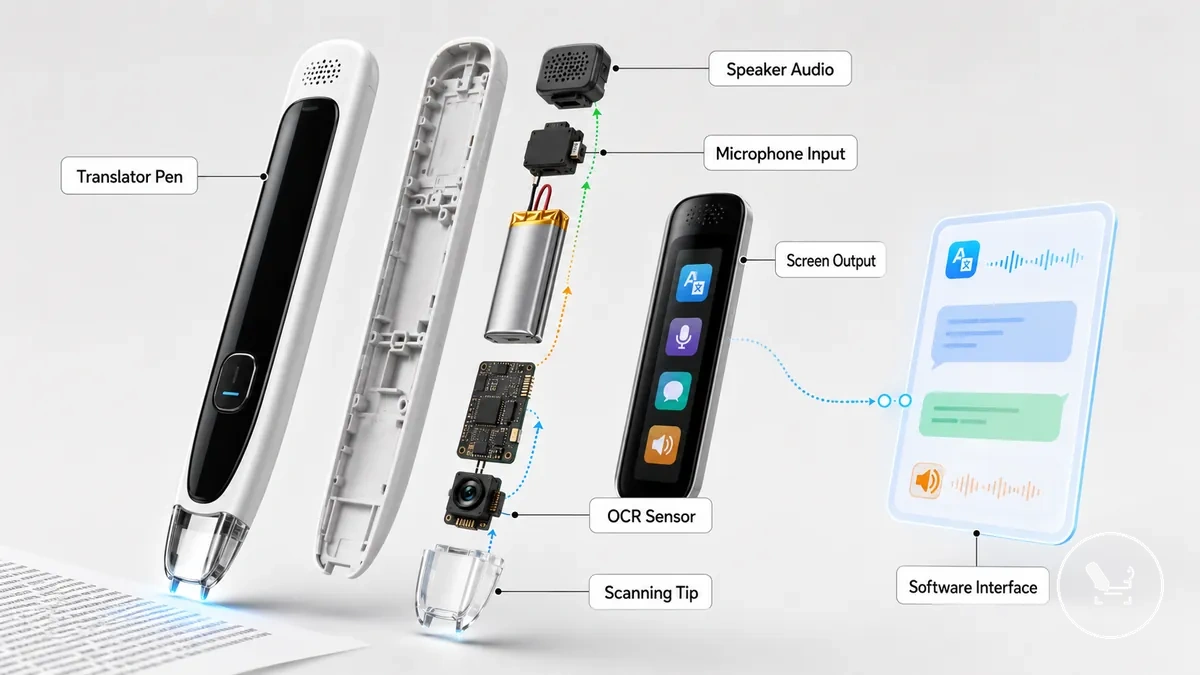
Most translator pen scanner designs share similar functional parts, although layout and naming can vary by model. The pen body holds the internal components, while the scanning tip and OCR sensor handle printed text capture. The screen and speaker provide visual and audio output, and the microphone and controls support interaction and input adjustments. Power is supplied through the battery, and the software interface manages recognition and translation processing. These parts work together as an integrated system, but exact configurations may vary depending on the device design. For broader functional context, the translator pen features overview helps relate these components to overall usage patterns.
| Part | Function | Effect on use |
|---|---|---|
| Pen body | Houses internal hardware components | Determines grip and overall structure stability |
| Scanning tip | Reads printed text from surfaces | Affects how smoothly text capture is performed |
| OCR sensor | Converts scanned text into digital characters | Influences recognition accuracy of printed text |
| Screen | Displays translation output | Enables direct reading of results |
| Speaker | Provides audio output | Supports listening-based translation feedback |
| Microphone | Captures voice input | Enables voice-based interaction functions |
| Controls | Manages scanning and settings | Affects ease of operation during use |
| Battery | Powers the device | Determines usage time and portability |
| Software interface | Processes OCR and translation logic | Influences overall output behavior and responsiveness |
:contentReference[oaicite:0]{index=0}
Scanning tip and OCR sensor
The scanning tip and OCR sensor in a translator pen scanner function as the local capture system that reads printed text and converts it into digital input for processing. The scanning tip manages contact with the printed line, while the OCR sensor interprets the captured text data. Together, they define how alignment and surface interaction affect initial text capture.
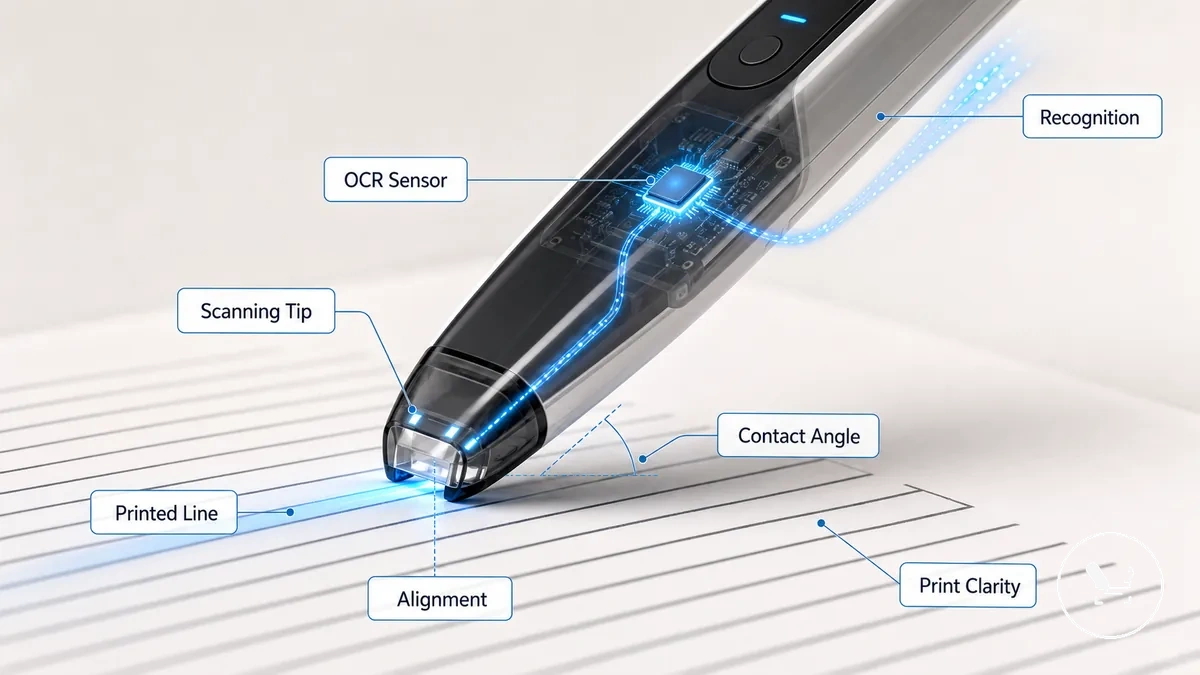
When the scanning tip moves along a printed line, the contact angle and alignment determine how consistently the OCR sensor can detect characters. Print clarity also influences recognition, especially when contrast is low or text is faint. In this context, OCR scan translation helps explain how captured input is processed after recognition.
- Alignment: controls how well the scanning tip follows the printed line
- Print clarity: affects how clearly characters are detected by the OCR sensor
- Sensor capture: determines how stable recognition is during scanning movement
A local edge case occurs when scanning curved pages or uneven surfaces, where alignment can break and recognition may become less stable due to inconsistent capture conditions.
Screen, speaker, microphone, and controls
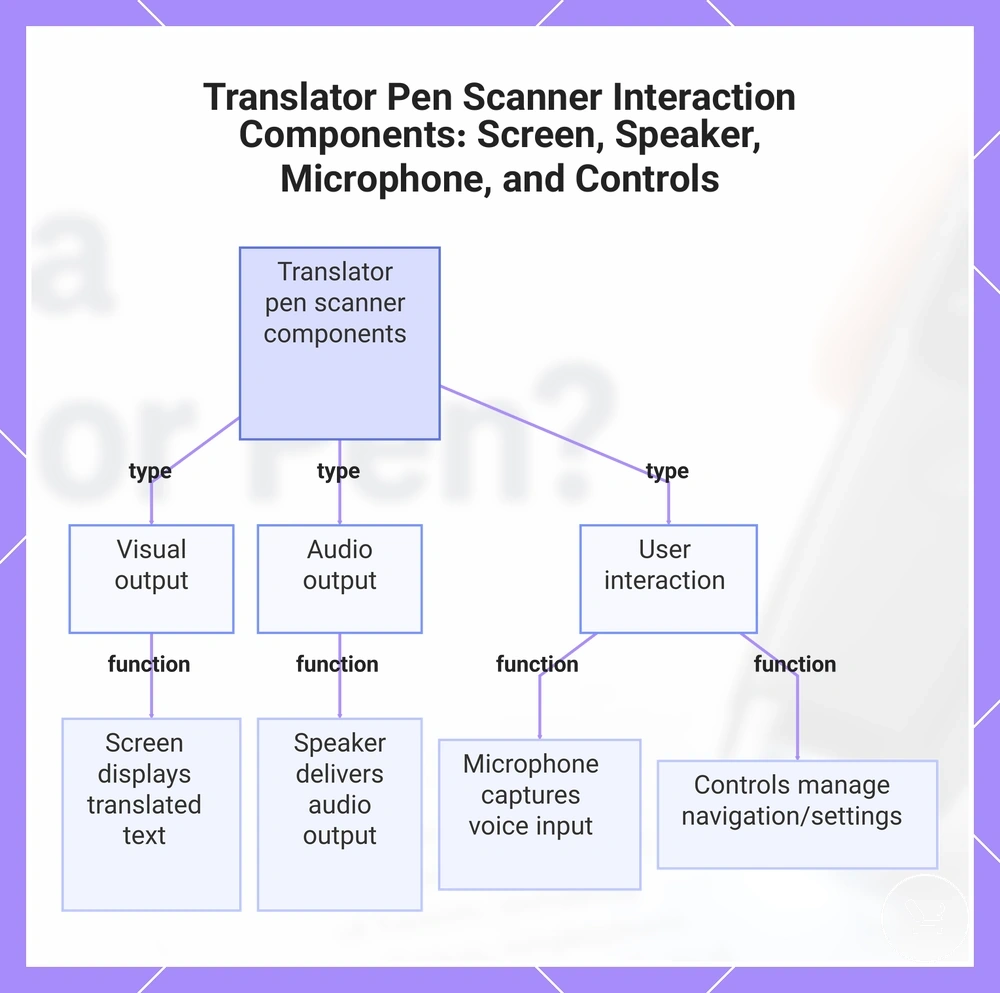
The screen, speaker, microphone, and controls are the main output and interaction components of a translator pen scanner that manage how translation output is displayed, heard, or controlled. The screen handles the display of translated text for reading, the speaker provides audio output including possible text-to-speech pronunciation, the microphone captures voice input when supported, and the controls manage navigation, settings, and playback actions. These components together separate visual translation output from audio and user interaction functions.
In different translator pen models, these elements may vary in availability and behavior depending on design focus, where some devices rely mainly on screen-based reading while others include additional voice input and playback support.
The screen, speaker, microphone, and controls function as distinct interaction layers:
- Screen: displays translated text for direct reading and visual translation output
- Speaker: delivers audio output and may support text-to-speech pronunciation
- Microphone: captures voice input for spoken phrases when available
- Controls: handle settings, navigation, and playback through buttons or touch input
This chart groups the main output and interaction components of a translator pen scanner into visual, audio, and user interaction functions.
How a translator pen captures printed text
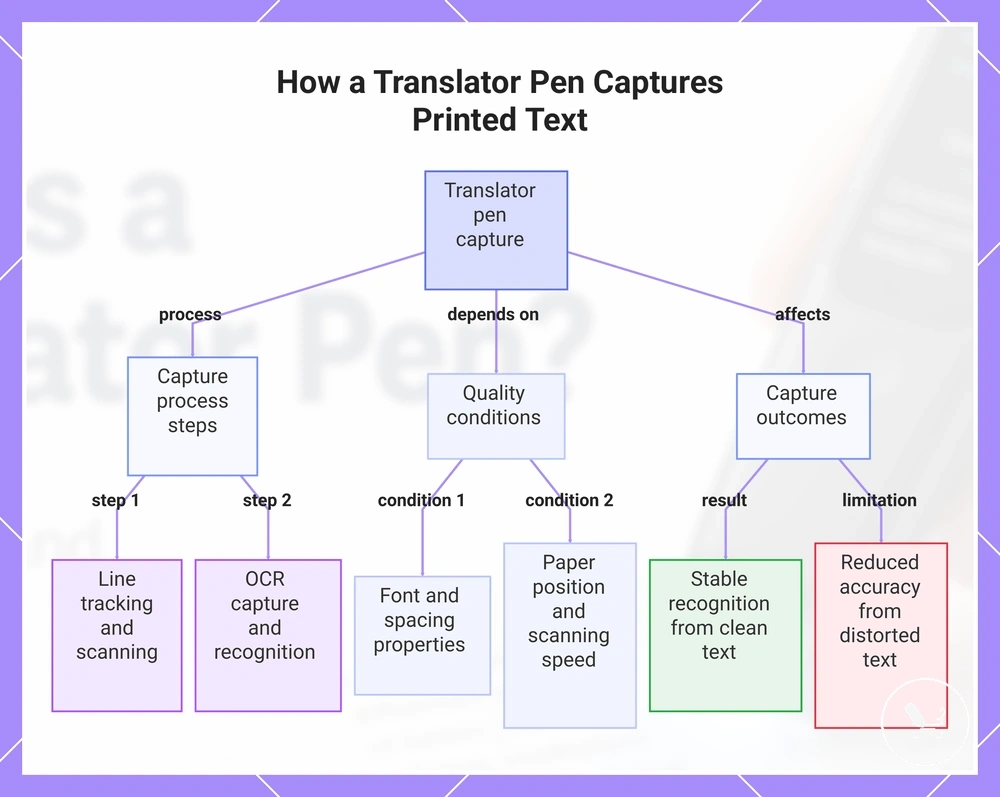
A translator pen captures printed text through a structured capture stage where it captures printed text from a printed line and converts it into digital scan input using line tracking and OCR capture. This process depends on font, spacing, paper position, and scanning speed, and capture quality varies based on these conditions rather than remaining constant across all printed material.
The capture sequence starts with line tracking over the printed line, where scanning speed and paper position influence stability of the scan input. OCR capture then processes the scanned data and applies language recognition to identify characters before passing the result toward translation output. This stage remains separate from translation and focuses only on converting printed material into readable digital data, as seen in OCR scan translation.
Printed text conditions strongly affect capture reliability, especially when font styles are irregular, spacing is uneven, or the page is curved or misaligned. Clean printed text usually supports more stable recognition, while handwritten or distorted text reduces accuracy because of weaker alignment between scan input and recognition stage. These limits show that capture performance depends on physical text conditions and scanning environment.
The capture process typically follows this order:
- Positioning: align scanner with printed line
- Scanning: move across printed text at controlled speed
- OCR capture: convert scan input into digital characters
- Recognition: apply language recognition to captured text
- Output handoff: forward data to translation output stage
This chart shows the capture process of a translator pen, including the main steps, quality conditions, and outcomes that affect recognition accuracy.
OCR conversion from scanned text to digital text
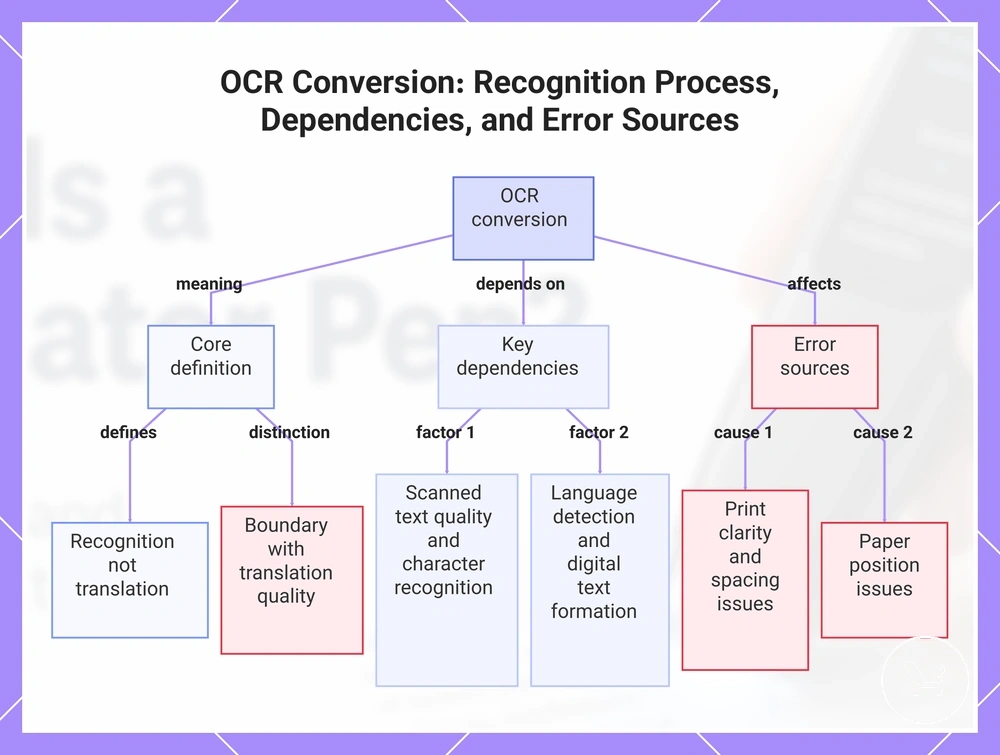
OCR conversion is the process that changes scanned text into digital text by applying character recognition to a scanned image of printed material. It functions as a recognition stage that identifies characters and converts them into machine-readable text, without performing translation. In this context, OCR conversion is defined as recognition rather than translation.
OCR conversion depends on scanned text quality, character recognition, language detection, and how digital text is formed from recognition output. Recognition errors may occur when print clarity, spacing, or paper position reduces scan stability, affecting how accurately characters are identified. A simple boundary exists between OCR conversion and translation quality, where recognition handles text formation while translation quality depends on language processing outcomes. In some cases, as described in translator pen accuracy, both stages influence the final result but remain technically separate.
This chart explains OCR conversion as a recognition process, its key dependencies, and common error sources.
Line scanning, word scanning, and text capture conditions
Line scanning, word scanning, and text capture conditions describe how scan mode determines the amount of printed text captured during a single reading pass. Line scanning captures a full printed line in one continuous text capture process, while word scanning isolates individual words as separate capture units. This difference directly changes how much text is read at once, with scan mode shaping the output structure.
Capture conditions such as alignment, font size, contrast, paper stability, and scan speed influence how reliably line scanning or word scanning performs. Alignment affects whether text capture follows the printed line correctly, while font size and contrast influence character clarity during recognition. Paper stability and scan speed affect continuity of scan input, where unstable pages or inconsistent movement can limit how smoothly text is captured. For example, a clean textbook line with stable paper position and high contrast typically produces more reliable line scanning than uneven or low-contrast printed text.
- Alignment: determines how accurately line scanning or word scanning follows printed text structure
- Font size: affects how clearly characters are separated during text capture
- Contrast: improves or reduces readability of scanned input
- Paper stability: supports continuous scan input without disruption
- Scan speed: influences consistency of capture across a printed line
How translation output is processed and shown
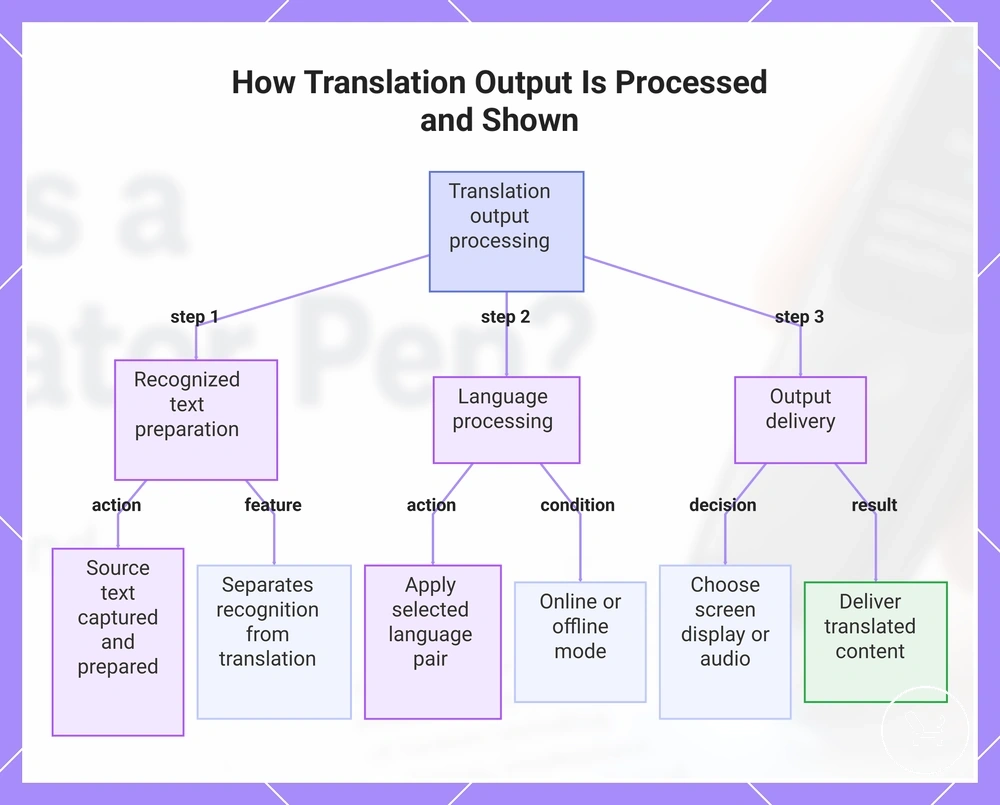
Translation output is processed when recognized source text is passed into a translation engine and converted into a usable result for reading or listening. It separates recognition from translation output, meaning the scanned text is first identified and then transformed into visible or audible translation output based on system handling and language setup.
The process begins with source text being received by the translation engine, which applies a selected language pair to generate the translated result. This stage involves structured processing of recognized text into translation output, followed by output selection for screen display or audio output. Depending on configuration, this may rely on online processing for broader language support or offline processing for local device handling. The translation engine and language pair together determine how the content is interpreted and rendered.
Screen display and audio output formats depend on how the processed result is delivered by the system and can vary based on context and device capability. Output reliability is influenced by OCR quality, vocabulary coverage, language support, and translation engine limitations, which may affect how the final result is presented rather than how it is initially recognized.
The output process typically follows this sequence:
- Recognized text: captured source text prepared for processing
- Language processing: translation engine applies the selected language pair
- Output selection: system decides between screen display or audio output
- Final result: translated content shown visually or spoken through audio output
This chart shows the main stages of processing translation output, from source text recognition to final display or audio delivery.
On-screen translation and text-to-speech output
On-screen translation and text-to-speech output refer to two main output modes that present translation output as either displayed translation on a screen or spoken output through audio. On-screen translation shows the processed result as displayed translation for reading, while text-to-speech converts the same result into spoken output using a speaker. These two modes separate screen output and audio output as distinct ways of consuming the translation result.
These output formats vary by model, meaning text-to-speech behavior, pronunciation quality, and playback control options may differ depending on language support and device capability. On-screen translation typically supports silent reading through displayed translation, while audio output provides reading support through spoken playback when available. For example, a user may read the on-screen translation silently for quick understanding, then use text-to-speech to hear pronunciation through the speaker for confirmation.
Output formats typically separate screen output and audio functions:
- On-screen translation: displays translated result as displayed translation for reading support on screen
- Text-to-speech: converts translation output into spoken output for pronunciation and listening support
- Playback control: manages how audio output is played, paused, or repeated during use
- Limitations: availability and quality of speech and pronunciation may vary by language support and model
Basic online and offline processing differences
Online processing and offline processing define how translation output is generated through cloud-based translation or local device resources. Online processing relies on Wi-Fi and cloud-based translation to access broader language support, while offline processing uses downloaded language packs and offline dictionaries to generate results without network access. This difference affects available languages, processing behavior, and output limitations.
Processing mode varies by device model, where some translator pen systems prioritise online processing for wider language support while others rely on offline processing for local use conditions. Language availability, output behavior, and feature access depend on the selected mode. Offline processing remains a compatibility and feature-dependent option rather than the defining function of a translator pen.
Comparison of processing modes:
| Online processing | Offline processing |
|---|---|
| Uses Wi-Fi and cloud-based translation for processing | Uses downloaded language packs and offline dictionaries |
| Supports broader language support via cloud translation | Limited to installed language packs and local resources |
| Depends on internet connectivity for translation output | Operates without Wi-Fi once language packs are installed |
| Cloud-based translation may adjust results based on server models | Local processing depends on stored language data |
| Limitations depend on connection stability and service access | Limitations depend on downloaded content and storage availability |
Translator pen, OCR reading pen, and dictionary pen differences
Translator pen, OCR reading pen, and dictionary pen differences describe how adjacent device labels refer to overlapping reading, scanning, and vocabulary lookup functions. A translator pen and scan translation pen typically focus on printed text scanning with translated output, an OCR reading pen focuses on text recognition with reading support, and a dictionary pen focuses on word-level definitions. These labels often overlap in function, depending on how main input and main output are handled.
The device label matters less than the dominant function because similar scanning input can lead to different outputs such as text-to-speech reading, translated sentences, or vocabulary definitions. A translator pen, OCR reading pen, scan translation pen, dictionary pen, and reading support device may share printed text capture but differ in typical use and output behavior. The table below organizes each label by main input, main output, and typical use.
| Device label | Main input | Main output | Typical use |
|---|---|---|---|
| Translator pen | Printed text scanning | Translated output (screen or text-to-speech) | Scan translation of printed material |
| OCR reading pen | Printed text recognition | Text display and reading support | Reading support with OCR extraction |
| Scan translation pen | Line-based text scanning | Translated sentences | Direct translation of printed text |
| Dictionary pen | Word-level scanning or selection | Definitions and vocabulary lookup | Word meaning and language learning support |
| Reading support device | Text capture input | Text-to-speech or simplified display | Assisted reading with pronunciation support |
translator pen features can help illustrate how these functions often overlap within the same device depending on configuration and model design.
When translator pens usually work well
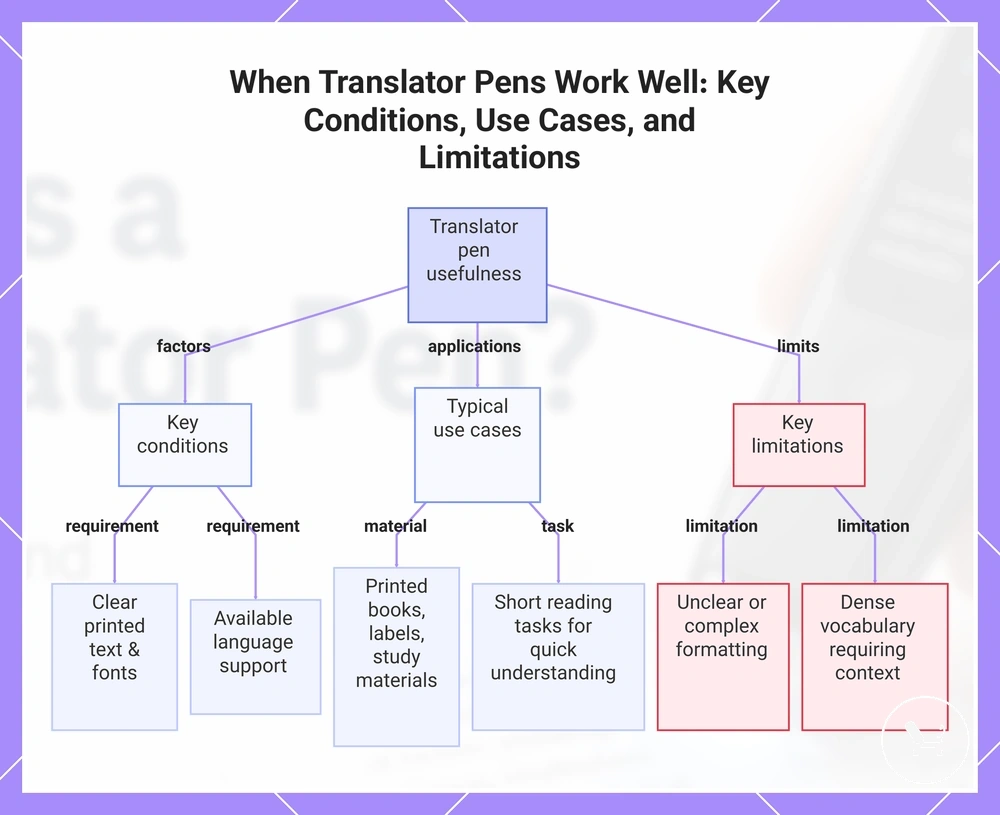
Translator pens usually work well when printed text is clear, language support is available, and the user task involves simple reading or quick interpretation. Their usefulness depends on text quality, supported languages, and the user task, which together determine whether scan-based reading can produce stable results.
They are typically suitable for printed books, labels, study materials, and travel documents when the text uses clear fonts and consistent formatting. In these cases, the device supports quick reading support for simple phrases and vocabulary, where translation or recognition can follow a direct text-to-output flow. Students, travellers, and readers often use them for short reading tasks where immediate understanding of printed content is needed, but the outcome still depends on the language pair and context of use.
Limitations appear when text is unclear, formatting is complex, or supported languages are not available for accurate recognition. In such cases, reading performance may vary, especially when vocabulary is dense or contextual meaning is required beyond simple phrase-level interpretation. For broader usage framing, see translator pen guide.
Usefulness depends on these conditions:
- Clarity of printed text and use of clear fonts
- Availability of supported languages for recognition and translation
- Suitability for simple phrases and vocabulary-based tasks
- Type of material such as printed books, labels, study materials, or travel documents
- Need for text-to-speech output or silent reading support
- Connectivity requirements depending on online or offline use
This chart shows the conditions that determine translator pen usefulness, the typical materials and tasks suitable for them, and the key limitations that reduce their effectiveness.
Basic limits of translator pen scanning and translation
Translator pen scanning and translation limits refer to conditions that prevent consistent performance across all text types and language situations. These limits usually come from handwriting, stylized fonts, poor contrast, curved pages, unsupported languages, offline restrictions, idioms, context loss, or OCR recognition errors, and they vary depending on how text is presented and processed.
Scanning limits are mainly influenced by handwriting, stylized fonts, poor contrast, curved pages, and OCR recognition errors that affect how accurately text is captured. When scan input is visually unclear or physically unstable, recognition quality may decrease, especially in cases where curved pages or low-contrast printing disrupt normal reading flow. Unsupported languages and offline restrictions can also reduce available processing paths, which increases recognition limitations under constrained conditions.
Translation limits occur when idioms, context loss, or restricted language support affects how meaning is interpreted after recognition. Even when OCR capture is successful, translation output may not fully preserve intent if contextual structure or vocabulary mapping is limited. This creates a separation between extracted text and interpreted meaning, which depends on language pair coverage and system capability.
The table below organizes basic limits by cause and likely effect:
| Cause | Likely effect |
|---|---|
| Handwriting and stylized fonts | Reduced OCR recognition accuracy |
| Poor contrast and curved pages | Unstable or incomplete text capture |
| Unsupported languages | Limited translation output availability |
| Offline restrictions | Reduced language processing coverage |
| Idioms and context loss | Less accurate or simplified meaning |
| OCR recognition errors | Incorrect or incomplete source text extraction |
These limits help set realistic expectations, while deeper accuracy behavior is covered in translator pen accuracy.